

-
August 7, 2026
-
BySteffy A
How to Download Form 16 and Use it for ITR Filing
Introduction
How to download Form 16 is a common question for salaried employees during Income Tax Return filing. Form 16 is a salary TDS certificate issued by an employer to an employee. It contains salary income, exemptions, deductions, taxable income, and TDS details for the financial year.
In simple words, Form 16 is proof that tax has been deducted from salary and deposited with the government by the employer. It helps employees verify income and tax details before filing their ITR. Under the Income-tax Act, 2025 and Income-tax Rules,2026, Form 16 has been renumbered as Form 130 from 1 April 2026. For earlier financial years, taxpayers may still commonly refer to it as Form 16.
This blog explains what is Form 16, how to download Form 16, and how to use Form 16 for ITR filing.
What is Form 16 under the Income Tax Act?
Form 16 is a salary TDS certificate issued by an employer to a salaried employee. It shows the salary paid, tax deducted, tax deposited, deductions claimed, and taxable income of the employee.
If tax is deducted from salary during the financial year, the employer issues Form 16 after filing the applicable TDS return. Employees use this certificate to check TDS details and file their Income Tax Return correctly.
Note: Under the Income Tax Act, 2025 and Income Tax Rules, 2026, Form 16 has been renumbered as Form 130 from 1 April 2026, applicable from Tax Year 2026-27. The purpose remains related to salary income and TDS details.
Benefits of Form 16 for Salaried Employees
If you are learning how to download Form 16, it is also important to understand its benefits for salaried employees.
Helps in ITR Filing
Form 16 gives salary income, deductions, exemptions, and TDS details in one place. This helps salaried employees file their Income Tax Return correctly.
Helps Calculate Tax Liability
Form 16 helps employees check taxable income, tax deducted, tax payable, or refund due before filing the ITR.
Useful as Income Proof
Form 16 may also be used as income proof while applying for loans, credit cards, visas, or other financial requirements.
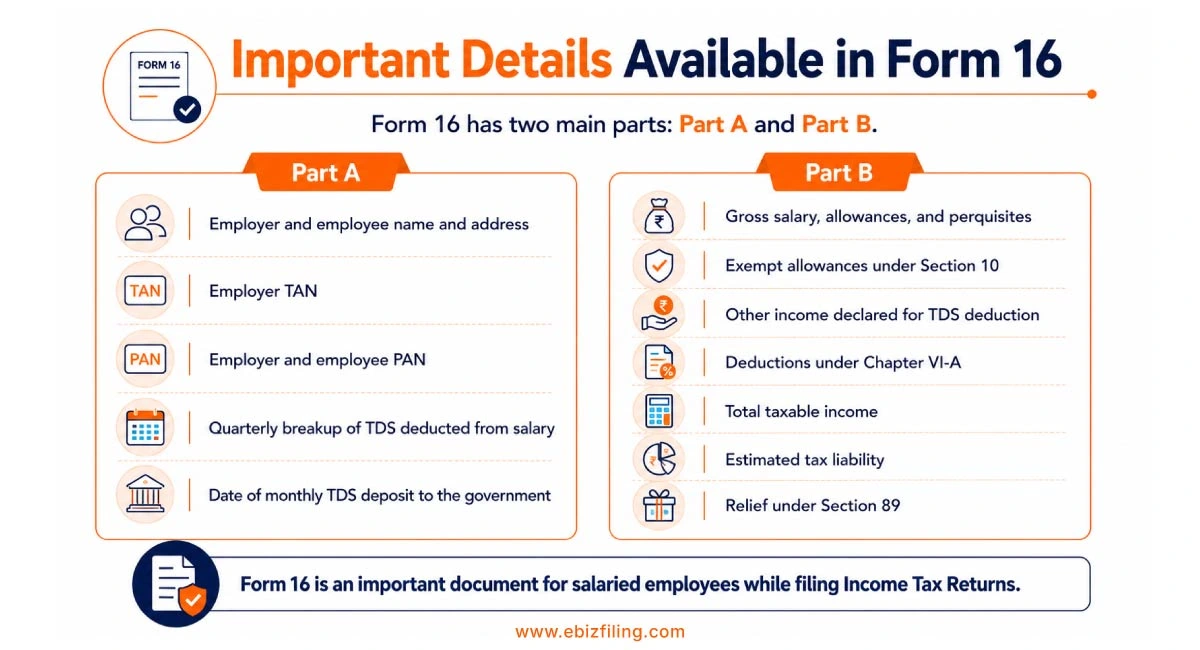
Important Details Available in Form 16
1. Part-A
- Name and address of employer and employee.
- TAN of the employer
- PAN of employer and employee
- Quarterly break-up of amount of TDS deducted against salary.
- Date in which monthly TDS deducted is deposited to the government.
2. Part-B
- Gross salary (including all allowances and perquisites)
- Exempt allowances under section 10 (reduced from gross salary)
- Income other than salary declared for TDS deduction purpose.
- Deductions under chapter VI-A
- Total taxable income offered for TDS deduction
- Estimated tax liability (tax, surcharge, cess and rebate is calculated separately as applicable)
- Relief under section 89.
In the case of salaried employees, Form 16 plays a very important role when it comes to filing income tax returns. It has two components: Part A and Part B.
How to Download Form 16?
If you are searching how to download Form 16, you should know that employees generally receive it from their employer. The employer downloads Form 16 from the TRACES portal after filing the TDS return and then issues it to the employee.
Steps to get or download Form 16:
- Contact your employer, HR, or payroll team.
- Log in to your company’s HR or employee portal, if available.
- Go to the salary, tax, or documents section.
- Select the appropriate financial year for which Form 16 is needed.
- Download Form 16, if it is available on the portal.
- Check your PAN, employer TAN, salary details, deductions, and TDS amount.
To understand TRACES registration in detail, read our guide on How to generate TRACES login using a registered TAN and Benefits of TRACES Registration.
How to File ITR Using Form 16?
After downloading Form 16, employees should use the details carefully while filing their Income Tax Return. Form 16 helps in reporting salary income, exemptions, deductions, and TDS details.
Steps to use Form 16 for ITR filing:
- Check your name, PAN, employer details, and assessment year.
- Verify salary income, exemptions, and deductions mentioned in Part B.
- Match TDS details with Form 26AS and AIS.
- Add other income, such as interest income, house property income, or capital gains, if applicable.
- Claim eligible deductions under Chapter VI-A.
- Calculate tax payable or refund due.
- File the correct ITR form and verify the return.
Difference between Form 16, Form 16B, and Form 16A
|
Basis |
Form 16 |
Form 16A |
Form 16B |
|
Issued by |
Form 16 is issued by the employer who deducts TDS from salary. | Form 16A is issued by the deductor who deducts TDS on income other than salary. | Form 16B is issued by the buyer of immovable property to the seller. |
| Applicable for | It is issued for TDS deducted on salary income. | It is issued for TDS deducted on income other than salary, such as interest, rent, commission, or professional fees. |
It is issued for TDS deducted on the sale of immovable property. |
|
Recipient |
It is given to salaried employees. | It is given to the person whose non-salary income is subject to TDS. |
It is given to the seller of the property. |
Also read: All about Form 16 and Form 16A of TDS to understand the difference between salary TDS certificates and non-salary TDS certificates.
Get ITR Filing Support with Ebizfiling
Ebizfiling helps salaried employees file their Income Tax Return with a proper review of Form 16, Form 26AS, AIS, deductions, exemptions, and TDS details. Our team checks salary income, taxable income, eligible deductions, tax payable, and refund due before filing the ITR.
Our ITR filing service includes:
- Review of Form 16 TDS certificate details
- Matching of Form 16 with Form 26AS and AIS
- Checking salary income, deductions, and exemptions
- Calculation of tax payable or refund due
- Online filing of the correct Income Tax Return form
If you know how to download Form 16 but are unsure how to use it for ITR filing, Ebizfiling can help you file your Income Tax Return accurately and smoothly.
Get expert assistance with Company IT Filing Service at Ebizfiling today.
Conclusion
Form 16 is an important document for salaried employees during ITR filing. It helps employees check salary income, deductions, taxable income, and TDS deducted by the employer. Employees should always match Form 16 details with Form 26AS and AIS before filing their return. From 1st April 2026, Form 16 has been renumbered as Form 130 under the Income tax Act, 2025. Therefore, salaried employees should understand both Form 16 and Form 130 to avoid confusion while checking salary TDS details and filing their Income Tax Return.
Suggested Reads:
Section 134 of the Income Tax Act
Frequently Asked Questions
1. When does an employer issue Form 16 to salaried employees?
An employer generally issues Form 16 to salaried employees on or before 15th June after the end of the financial year in which salary TDS is deducted. It helps employees check salary income, deductions, and TDS details before filing ITR.
2. How to download Form 16 from employer?
Employees can download Form 16 from their company’s HR, payroll, or employee portal if the employer provides online access. If it is not available there, they should request it from the HR or accounts team.
3. Can employees download Form 16 online from TRACES?
Salaried employees generally cannot download Form 16 directly from TRACES. The employer or deductor downloads it from TRACES after filing the relevant TDS return and then provides it to the employee.
4. What should I do if Form 16 is not available on the employee portal?
If Form 16 is not available on the employee portal, contact your HR, payroll, or accounts team. Employees searching how to download Form 16 should note that the employer may issue it by email or upload it after completing TDS return filing and downloading it from TRACES.
5. Why should Form 16 be checked with Form 26AS and AIS before ITR filing?
Form 16 should be checked with Form 26AS and AIS to confirm that salary TDS details match government records. If there is a mismatch, it may affect TDS credit, refund processing, or lead to a tax notice.
6. What details are included in Form 16 Part A and Part B?
Form 16 Part A and Part B contain different details. Part A includes employer, employee, PAN, TAN, and TDS deposit details, while Part B includes salary breakup, exemptions, deductions, taxable income, and tax payable details.
7. Is Form 16 the same as a salary certificate?
No, Form 16 and a salary certificate are not the same. Form 16 is a salary TDS certificate issued by an employer for tax deducted from salary under the Income Tax Act. A salary certificate is generally used as proof of salary or employment for banks, loans, credit cards, or visa purposes. Form 16 is mainly used for ITR filing because it contains salary income, deductions, taxable income, and TDS details.
8. Can Form 16 be downloaded using PAN?
No, Form 16 cannot generally be downloaded by salaried employees using only a PAN number. If you are checking how to download Form 16, remember that it is usually downloaded by the employer or deductor through TRACES after filing the TDS return. Employees can use PAN to verify TDS details in Form 26AS or AIS, but Form 16 should be collected from the employer, HR team, payroll team, or employee portal.
9. What is Form 130 and how is it related to Form 16?
Under the Income-tax Act, 2025, Form 16 has been renumbered as Form 130 from 1 April 2026. In salary cases, it continues to work as a TDS certificate for salary income, but the form number and format have changed under the new framework.
10. How does Ebizfiling help with Form 16 for ITR filing?
Ebizfiling helps salaried employees review Form 16 TDS certificate details, compare them with Form 26AS and AIS, calculate deductions, and file the correct Income Tax Return. This helps reduce errors while filing ITR.





TDS Return
Quickly file error-free TDS Returns with EbizFIling at affordable prices.
About Ebizfiling -



Reviews
Anaita Mehra
19 Jun 2018I am glad I came across Ebizfiling. They helped me through my Patent procedure and I must say it was quick and hassle-free. Definitely recommended!
Deepanker Gautam
25 Jan 2019Excellent service by your team really like your service a lot specifically client handling is too good and special credit to my manager Dhwani mam you have given your best thank you so much for your kindness and supporting beahavior. I will surely give reference for your company.
Hetal Verma
27 Jan 2018Great work done by the Ebizfiling team. Good luck for the future.
September 30, 2026 By Srishti M
October 14, 2026 By Srishti M
September 29, 2026 By Srishti M
Income Tax Compliance Calendar October 2026: Filing Guide Introduction The Income Tax Compliance Calendar October 2026 highlights important income tax obligations applicable to taxpayers, businesses and entities covered under audit and transfer pricing provisions. October 2026 includes key compliance […]