

-
September 16, 2026
How to Find HSN Code in GST Portal: A Complete Guide
Introduction
Finding the correct HSN code in GST portal is important for businesses supplying goods. It supports product classification, invoicing, tax treatment, and outward supply reporting. An error can affect GST rates, GSTR-1, e-invoices, e-way bills, and customer records.
The official GST website provides an HSN and SAC search facility in pre-login and post-login modes. Taxpayers can search by code or product description. However, the result is a facilitation tool and not a legally binding classification decision. A business should compare it with the Customs Tariff, applicable GST notifications, and the actual product before using the HSN code in GST portal.
This guide covers HSN meaning, digit requirements, official search, verification, and GSTR-1 reporting.
Quick Insights
- The HSN code in GST portal is used to search classifications for goods.
- HSN codes classify goods, while SAC codes classify services under GST.
- The search facility is available before and after GST portal login.
- Four-digit or six-digit reporting depends on preceding-year turnover.
- HSN-wise outward supplies are reported in Table 12 of GSTR-1 or GSTR-1A.
What Is an HSN Code Under GST?
HSN stands for Harmonised System of Nomenclature. It classifies goods for taxation and international trade. Under GST, businesses use HSN codes on invoices, returns, e-invoices, e-way bills, and product records.
A two-digit number identifies a chapter, four digits identify a heading, six digits identify a subheading, and eight digits identify a tariff item under the Indian Customs Tariff. CBIC has clarified that Customs classifications are also used for GST purposes.
A search for an HSN code in GST portal may display several related entries. The correct choice depends on the product’s material, function, manufacturing process, form, packaging, and commercial identity. Businesses can review our GST HSN code list before confirming the HSN code in GST portal through official sources.
Difference Between HSN and SAC Codes
HSN applies to goods, while SAC stands for Services Accounting Code and applies to services.
A business supplying goods and services may need both classifications. Select Goods for an HSN code in GST portal and Services for SAC. Ebizfiling’s guide on the difference between HSN and SAC codes explains their use.
Why Is the Correct HSN Code Important?
Correct classification supports uniform reporting and helps a business examine the applicable GST rate. It also keeps invoices, accounting records, e-invoices, e-way bills, and GST returns consistent.
Rule 46 of the CGST Rules includes the HSN code for goods or accounting code for services among tax invoice particulars, subject to notified requirements. A business should not select an HSN code in GST portal merely because its description appears similar.
Using an incorrect HSN code in GST portal may cause tax differences, amendments, mismatches, disputes, and assessment questions. Extra care is required where product characteristics affect classification.
How Many HSN Digits Are Required Under GST?
The required number of digits depends on aggregate annual turnover in the preceding financial year.
A taxpayer whose aggregate turnover in the preceding financial year is up to ₹5 crore must mention at least a four-digit HSN code on B2B invoices. A taxpayer whose aggregate turnover in the preceding financial year exceeds ₹5 crore must mention at least a six-digit HSN code on invoices issued for taxable supplies. These requirements have applied from April 1, 2021, under Notification No. 78/2020 – Central Tax.
Importers and exporters generally use the eight-digit tariff item under the Indian Customs Tariff. Businesses should review turnover every financial year because growth may change the reporting requirement. Before entering an HSN code in GST portal, confirm whether four, six, or eight digits are required. Reporting fewer digits may cause validation problems or incomplete return data.
How to Search HSN Code in GST Portal
The GST manual confirms that taxpayers can use the search tool without logging in and after logging in. Follow these steps to find an HSN code in GST portal accurately.
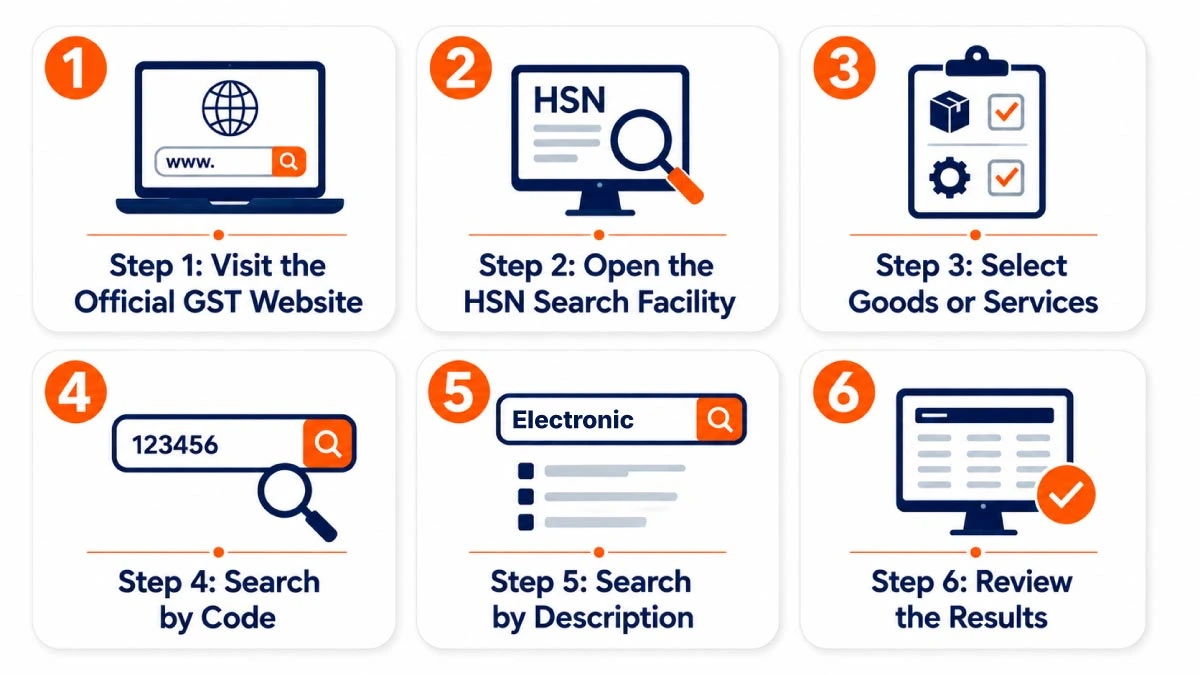
Step 1: Visit the Official GST Website
Open the official GST website and verify the final classification through government sources. For a preliminary check, businesses may use our GST Rate with HSN and SAC Code tool before verifying the HSN code in GST portal.
Step 2: Open the HSN Search Facility
Go to Services > User Services > Search HSN Code. The same route is available after login. The portal also lets users download the HSN directory in Excel format for reviewing classifications and maintaining product masters.
The HSN code in GST portal can then be searched by code or description.
Step 3: Select Goods or Services
Select Goods when classifying a product and Services when classifying a service. A taxpayer looking for an HSN code in GST portal should choose Goods and enter a technically accurate product description.
Step 4: Search by Code
The official manual allows at least the first three characters of an HSN code. This helps when a possible code appears on an invoice, catalogue, Customs document, or earlier return.
Select the relevant entry, complete the captcha where required, and click Search. Compare the full heading and description before saving the HSN code in GST portal records.
Step 5: Search by Description
Taxpayers can also enter at least three characters of a product description. Specific terms usually provide better results. Consider the material, function, processing method, form, and intended use.
A broad description may display several headings. Review each entry before deciding which HSN code in GST portal applies to the goods supplied.
Step 6: Review the Results
The result may show the chapter, heading, technical description, trade description, and related four-digit, six-digit, or eight-digit codes.
Compare product specifications, composition, packaging, manufacturing information, and tariff notes. The HSN code in GST portal must represent the actual goods, not only their marketing name.
How to Verify the Selected HSN Code
The GST portal states that its HSN search facility is for taxpayer facilitation and is not legally binding. The result should be treated as a reference point.
After finding an HSN code in GST portal, examine the Customs Tariff heading, section notes, chapter notes, GST rate schedule, exemption notifications, and relevant CBIC circulars. Classification may depend on ingredients, essential character, capacity, processing, presentation, or intended use.
Do not rely entirely on a vendor invoice because the products may differ. Professional review may be appropriate for complex goods or significant rate differences.
How to Report HSN Details in GSTR-1
HSN-wise outward supplies are reported in Table 12 of GSTR-1 or GSTR-1A. GSTN validations require a minimum of four or six digits according to aggregate annual turnover in the preceding financial year.
From the May 2025 return period, Phase 3 divided Table 12 into separate B2B Supplies and B2C Supplies tabs. Taxpayers must report the respective HSN summaries in the correct tab. The portal also provides a downloadable HSN and SAC list with descriptions.
While preparing Table 12, select the applicable HSN or SAC code from the list available on the GST portal instead of entering it manually. Review the system-populated description and provide the applicable UQC, quantity, taxable value, GST rate, and tax amounts. Report B2B and B2C supplies separately under their respective tabs and reconcile the totals before generating the return summary.
The portal may allow HSN-wise details to be imported from e-invoices. Review imported data because it may overwrite Table 12 information already entered. Businesses requiring support can use Ebizfiling’s Form GSTR-1 filing service. For broader compliance, Ebizfiling also provides GST return filing services.
Mistakes While Selecting an HSN Code
A common mistake is selecting the first broad search result. Similar goods may fall under different headings because of their characteristics. Another error is copying a supplier’s code without checking the goods sold. Taxpayers may also confuse trade names with tariff descriptions, mix HSN and SAC, use too few digits, or retain outdated codes.
Businesses should not assume that the HSN code in GST portal automatically confirms the GST rate. The rate may depend on the complete tariff entry, notification conditions, exemptions, and exact description. Check official CBIC rate information before applying it.
What If the Required HSN Code Is Not Found?
Search again using alternative technical descriptions, trade descriptions, or possible numeric headings. Confirm that Goods is selected and at least three characters have been entered. The official manual advises taxpayers to raise a ticket if a valid code is unavailable. Downloading the HSN directory may also help identify a related classification.
Do not select an unrelated HSN code in GST portal simply to complete an invoice or return. Keep technical specifications, product literature, supplier documents, and classification notes available for review.
Consequences of Using the Wrong HSN Code
An incorrect classification can produce a lower or higher GST rate than required. A lower rate may create additional tax, interest, and penalty exposure. A higher rate may lead to excess collection, customer concerns, credit complications, and correction work.
The wrong HSN code in GST portal can create differences between invoices, e-invoices, e-way bills, and GSTR-1. Review the HSN code in GST portal whenever product details change. When an error is discovered, review the affected invoices, tax periods, returns, and tax difference, and retain support for the corrected classification.
Need Help Finding the Correct HSN Code?
Selecting the correct HSN code can be difficult when a product has multiple possible classifications or different GST rates. Ebizfiling can assist businesses with HSN and SAC code identification, GST registration, GSTR-1 filing, and regular GST return compliance. Our professionals review the available product details and help businesses maintain accurate GST records.
Connect with Ebizfiling for professional GST compliance support.
Conclusion
Finding the correct classification requires precise descriptions, review of related headings, and verification of the HSN code in GST portal through official tariff material and GST notifications.
The correct HSN code in GST portal supports accurate invoicing, appropriate GST treatment, cleaner GSTR-1 reporting, and consistent compliance records. Since the tool is not a binding classification decision, retain supporting documents and seek expert guidance for complex products. Businesses beginning their GST journey can also apply for GST registration online with Ebizfiling.
Frequently Asked Questions
1. How is the HSN code determined for a product made from multiple materials?
The classification is determined using the General Rules for Interpretation of the Customs Tariff. First, check whether a specific heading accurately describes the product. When multiple headings may apply, the product may be classified according to the material or component that gives it its essential character. Product composition, function, and commercial identity must be reviewed together.
2. Which code applies when goods and services are sold together as one package?
The answer depends on whether the transaction is a composite supply or mixed supply. A naturally bundled composite supply is taxed according to its principal supply. A mixed supply, where independent items are sold together for one price, is generally taxed at the highest GST rate applicable to any item in the package.
3. Should job-work charges be reported under an HSN code or SAC?
Job-work charges are generally classified under a SAC because job work is treated as a service under GST. Job work refers to a treatment or process performed on goods belonging to another registered person. The goods themselves continue to retain their relevant HSN classification, while the processing charges are reported using the applicable service classification.
4. Can one GST invoice contain multiple HSN codes?
Yes, one GST invoice can contain multiple HSN codes when different types of goods are supplied. Each product line should show the applicable HSN code, description, quantity, UQC, taxable value, GST rate, and tax amount. Businesses should not use one common HSN code for unrelated products merely because they appear on the same invoice.
5. Which HSN code applies to stock transferred between two GST registrations?
The goods retain their normal HSN classification during a stock transfer. A transfer between separate GST registrations of the same legal entity may be treated as a supply between distinct persons, even when no consideration is charged. The transaction type does not change the product’s HSN code, although valuation and tax treatment must be reviewed separately.
6. Is an HSN code required when a business distributes free samples?
Free samples supplied without consideration are generally not treated as taxable supplies unless the transaction falls under Schedule I of the CGST Act. Therefore, a normal tax invoice may not be required solely for distributing a free sample. However, businesses should retain the correct HSN classification in inventory and movement records. Input tax credit is restricted for goods distributed as gifts or free samples.
7. Can a taxpayer obtain an advance ruling for an HSN classification dispute?
Yes, classification of goods or services is one of the questions for which an advance ruling may be requested under Section 97 of the CGST Act. An eligible applicant can submit Form GST ARA-01 with supporting product documents and the prescribed fee. This option is useful when a classification may materially affect the applicable GST rate or tax liability.
8. Is an advance ruling on an HSN code binding on every taxpayer in India?
No, an advance ruling is not automatically binding on every taxpayer. It is generally binding on the applicant who requested it and the concerned or jurisdictional tax officers dealing with that applicant. Another business may study the ruling for guidance, but it must independently assess its product facts and legal position.
9. What product information should be shared with Ebizfiling for HSN code assistance?
Businesses should share the product name, composition, raw materials, manufacturing process, technical specifications, packaging, principal use, catalogue, sample invoice, and any previously used HSN code. Detailed information allows the classification to be compared with relevant tariff descriptions and GST rate entries. Ebizfiling provides assistance with HSN and SAC identification and related GST compliance.
10. Can Ebizfiling guarantee that an HSN classification will never be disputed?
No, an HSN classification cannot responsibly be presented as permanently guaranteed or legally undisputed. Ebizfiling can assist with product review, tariff comparison, and GST compliance based on the documents provided. However, the GSTN search facility itself is not legally binding, and complex classification disputes may require professional legal analysis or an advance ruling.





Get Online GST Registration
Make your business GST Compliant. Never lose on GST input credit ever. Obtain your GST Registration Online at INR 1999/- only.
About Ebizfiling -



Reviews
Hemanshu Mahajan
01 Apr 2018I registered my LLP company, from eBizfilling. Great team and very competitive pricing. Will definitely use their services again.Thanks for work well done.
Neha Mody
27 Nov 2017“Quite impressed with the professionalism and efficiency that ebiz- filing have demonstrated throughout! Everything runs like clockwork. This means that I can concentrate on building my profession and not be worrying about compliance requirements, the team takes care of it all. Excellent work!!"
Pavani Reddy
18 Apr 2022I took trade mark registration from Ebizfiling india private limited thank you for registration and completing the process on time.
October 12, 2026 By Srishti M
September 30, 2026 By Srishti M
GST Appeal Against NIL Demand Now Allowed on GST Portal Introduction The Goods and Services Tax Network (GSTN) has introduced a portal-level update allowing eligible taxpayers to file appeals against GST demand orders where the demand amount is reflected as […]
September 28, 2026 By Srishti M
GST Section 74 Notice: Key Supreme Court Guidelines for Valid SCNs Overview A GST Section 74 notice is a serious GST communication because it may involve allegations of fraud, wilful misstatement or suppression of facts to evade tax. For tax […]