

-
July 18, 2026
-
BySteffy A
Errors and Corrections in Form 26AS: How to Fix Them
Introduction
Errors and Corrections in Form 26AS are important for taxpayers who want to ensure accurate Income Tax Return (ITR) filing and avoid issues related to tax credits. Form 26AS serves as a consolidated tax statement that helps taxpayers verify TDS, TCS, tax payments, refunds, and specified financial transactions recorded against their PAN.
Under the Income Tax Act, 1961, this statement was known as Form 26AS. With the implementation of the Income Tax Act, 2025 from 1 April 2026, the statement has been renumbered as Form 168. Although the form number has changed, its purpose remains substantially the same.
Understanding Errors and Corrections in Form 26AS can help taxpayers identify discrepancies early and take corrective action before filing their ITR.
What is meant by Form 26AS?
Form 26AS is an annual tax statement that provides a summary of tax-related information linked to a taxpayer’s PAN. It contains details such as:
- Tax Deducted at Source (TDS)
- Tax Collected at Source (TCS)
- Advance tax payments
- Self-assessment tax payments
- Income tax refunds
- Certain specified financial transactions
Taxpayers relied on Form 26AS under the Income Tax Act, 1961 to verify tax credits and reconcile their tax records. From 1st April 2026, taxpayers may see this statement referred to as Form 168 under the Income Tax Act, 2025. However, the objective of reviewing tax information and identifying Errors and Corrections in Form 26AS remains unchanged.
Why Should Taxpayers Review Form 26AS Before Filing an ITR?
Reviewing Form 26AS before filing an ITR helps taxpayers:
- Verify that TDS credits are correctly reflected.
- Detect any Form 26AS mismatch in ITR.
- Avoid incorrect tax credit claims.
- Ensure income details are accurately reported.
- Reduce the chances of receiving notices from the Income Tax Department.
- Facilitate faster processing of tax refunds.
Carefully checking Errors and Corrections in Form 26AS before filing an ITR can prevent future tax disputes and compliance issues.
What are the Common Errors in Form 26AS?
Several discrepancies may appear in a taxpayer’s statement. Some common Errors and Corrections in Form 26AS include:
1. TDS Not Reflecting in Form 26AS
A taxpayer may find that tax deducted by an employer, bank, or other deductor is not reflected in the statement. This usually occurs when the deductor has not filed or has delayed filing TDS return.
2. Incorrect PAN Mentioned by the Deductor
If the deductor reports an incorrect PAN while filing the TDS return, the tax credit may not appear in the correct taxpayer’s account. To avoid such issues, taxpayers should ensure that they have a valid PAN and that it is correctly communicated to the deductor. If you need assistance with obtaining a PAN, EbizFiling can help you with the PAN application process quickly and efficiently.
3. Incorrect TDS Amount
The TDS amount shown in Form 26AS may differ from the amount actually deducted due to reporting errors made by the deductor.
4. Missing Tax Payment Details
Advance tax or self-assessment tax paid by the taxpayer may not appear because of challan-related errors or processing delays.
5. Duplicate Entries
In some cases, the same transaction may be reported more than once, creating discrepancies in tax records.
6. Form 26AS Mismatch with ITR
A mismatch may arise when the income or tax credit details reported in the ITR differ from those appearing in Form 26AS.
Identifying these issues is the first step in resolving Errors and Corrections in Form 26AS.
What Causes a TDS Mismatch in Form 26AS?
A TDS mismatch in Form 26AS may occur due to various reasons, including:
- Incorrect PAN quoted by the deductor
- Errors while filing TDS returns
- Delay in filing TDS statements
- Non-deposit of deducted tax by the deductor
- Incorrect reporting of TDS amounts
- Data entry mistakes
Whether taxpayers review Form 26AS under the earlier law or Form 168 under the new law, these issues can still result in mismatches that require attention falling to the requirements of Errors and Corrections in Form 26AS .
How to Identify Errors in Form 26AS?
Taxpayers should regularly compare the information available in Form 26AS with their supporting documents. The following checks can help identify Errors and Corrections in Form 26AS :
- Compare Form 26AS with Form 16 and Form 16A.
- Verify tax payment challans.
- Match TDS details with salary slips or bank records.
- Review personal information such as PAN and name.
- Compare tax credits claimed in the ITR with those reflected in Form 26AS.
Regular verification helps taxpayers detect Errors and Corrections in Form 26AS before submitting their return.
How to Correct Form 26AS Errors?
The process for correcting discrepancies generally involves the following steps:
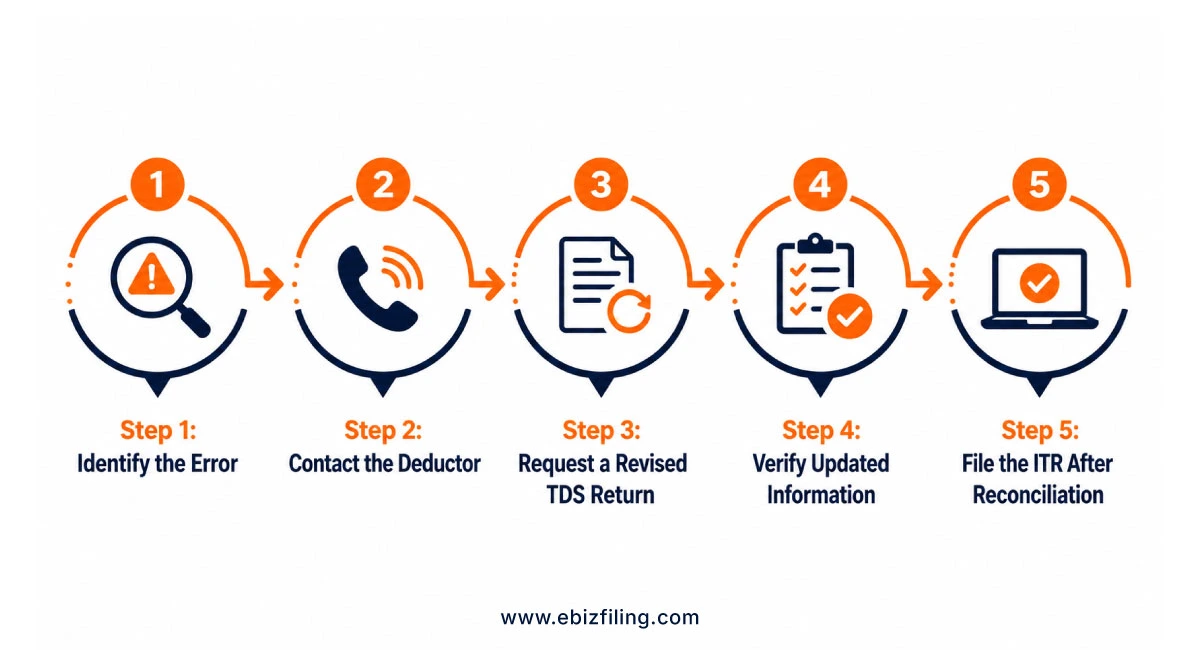
Step 1: Identify the Error
Carefully review Form 26AS and compare it with tax-related documents to determine the nature of the discrepancy.
Step 2: Contact the Deductor
If the error relates to TDS reporting, the taxpayer should contact the employer, bank, tenant, or any other deductor responsible for filing the TDS return.
Step 3: Request a Revised TDS Return
The deductor may need to file a correction statement or revised TDS return to rectify the reported information.
Step 4: Verify Updated Information
Once the correction is processed, taxpayers should recheck Form 26AS to ensure that the revised details are reflected correctly.
Step 5: File the ITR After Reconciliation
The return should be filed only after reconciling tax credits and income details with the information available in Form 26AS.
Following these steps can help resolve Errors and Corrections in Form 26AS efficiently.
What is the Form 26AS Correction Process Online?
The Form 26AS correction online process generally involves:
- Accessing the Income Tax Portal.
- Viewing or downloading Form 26AS or Form 168.
- Comparing the statement with Form 16, Form 16A, and tax payment records.
- Contacting the deductor if discrepancies are found.
- Requesting the deductor to file a correction statement where necessary.
- Verifying the updated details after processing.
Although taxpayers may now refer to Form 168 under the Income Tax Act, 2025, the approach for handling Errors and Corrections in Form 26AS remains broadly similar.
Consequences of Not Correcting Errors in Form 26AS
Ignoring discrepancies may result in:
- Rejection of tax credit claims
- Incorrect tax liability calculations
- Delayed tax refunds
- Income tax notices seeking clarification
- Additional tax demands due to unmatched credits
Therefore, taxpayers should promptly address Errors and Corrections in Form 26AS before filing their return.
Simplify Your Income Tax Compliance with EbizFiling
Whether you’re dealing with a TDS mismatch, missing tax credits, or other Form 26AS discrepancies, our professionals can help you complete your tax filing accurately and on time.
File Income Tax Return with EbizFiling and stay compliant with confidence.
Conclusion
Understanding Errors and Corrections in Form 26AS is essential for accurate tax compliance and smooth ITR filing process. Common issues such as TDS mismatches, incorrect PAN details, missing tax credits, and reporting errors can affect tax calculations and refund claims. While Form 26AS under the Income Tax Act, 1961 has been renumbered as Form 168 under the Income Tax Act, 2025 with effect from 1 April 2026, the importance of reviewing tax information remains the same. By identifying discrepancies early and following the appropriate correction process, taxpayers can ensure accurate reporting and avoid unnecessary tax complications.
Frequently Asked Questions
1. Can I claim TDS in my ITR if it is not reflected in Form 26AS?
No. Generally, TDS credit is allowed based on the information available in Form 26AS (or Form 168 under the Income Tax Act, 2025). If the TDS is not reflected, you should first contact the deductor and request correction of the TDS return before filing your ITR.
2. What should I do if the TDS amount in Form 26AS differs from the amount shown in Form 16?
You should compare both documents and identify the discrepancy. In most cases, the employer or deductor may have filed incorrect TDS details. Request the deductor to file a revised TDS return to rectify the mismatch.
3. How long does it take for corrected TDS details to appear in Form 26AS?
After the deductor files a revised TDS return and it is processed by the tax authorities, the corrected information generally appears within a few weeks. The timeline may vary depending on processing by the Income Tax Department.
4. Can an incorrect PAN in the TDS return cause a Form 26AS mismatch?
Yes. If the deductor quotes an incorrect PAN while filing the TDS return, the tax credit may be reflected in another taxpayer’s account or may not appear at all, resulting in a mismatch in Form 26AS.
5. Why is my advance tax payment not visible in Form 26AS?
This may happen due to incorrect challan details, PAN errors, bank reporting issues, or delays in updating tax payment records. You should verify the challan details and contact the concerned authorities if the issue persists.
6. Can duplicate TDS entries in Form 26AS affect my ITR filing?
Yes. Duplicate entries can create confusion regarding the actual tax credit available. Taxpayers should verify the correctness of such entries and seek clarification from the deductor before filing their ITR.
7. What documents should be checked while identifying Form 26AS errors?
Taxpayers should compare Form 26AS with Form 16, Form 16A, salary slips, bank TDS certificates, tax payment challans, and other supporting records to identify discrepancies.
8. Has the correction process changed after Form 26AS was renamed as Form 168 under the Income Tax Act, 2025?
While Form 26AS has been renumbered as Form 168 under the Income Tax Act, 2025, the process of identifying discrepancies and requesting corrections through the deductor remains substantially similar.
9. How can EbizFiling help in resolving Form 26AS mismatches?
EbizFiling assists taxpayers in reviewing Form 26AS/Form 168, identifying discrepancies, reconciling tax credits, and providing guidance on the appropriate corrective steps before filing an ITR.
10. Can EbizFiling assist with PAN-related issues that may lead to Form 26AS errors?
Yes. EbizFiling can help with PAN application and PAN-related compliance services. Ensuring accurate PAN details can help prevent TDS mismatches and tax credit issues in Form 26AS.





Income Tax Return
File Income Tax Return with Ebizfiling at affordable prices
About Ebizfiling -



Reviews
Ajay kumar
14 Jun 2019Good service provided by ur staff.
Gadilinga
30 Sep 2019Excellent support which i never expected. their timely response, guidance, reminding, problem solving, pocket friendly. Ms arthi, Ms ishani, Ms vaishali and few others i dont know their names provided service like my own staff.
Debasis Mishra
28 Jul 2020Very good Service. The staffs are very cooperative. Particularly Nilesh is very cooperative and punctual. They deliver all the documents on time. Thank you all for your support.
October 31, 2026 By Srishti M
October 29, 2026 By Srishti M
October 28, 2026 By Srishti M