

-
May 7, 2026
-
BySteffy A
Process to Update Mobile Number on GST Portal 2026
Know the Importance of mobile number updation
To Update Mobile Number on GST Portal is important for maintaining your GST compliance, as it delivers OTPs, updates, and formal notices to your registered mobile phone number. If the number of your phone changes, you have to change it immediately to prevent missing important communications. This guide will show you how to update your mobile number on the GST Portal each step with Ebizfiling in 2026.
Eligibility to Update Mobile Number on GST Portal
Only someone who has been given permission can change the registration information in the GST account. That signifies in real life:
- The main authorized signatory (promoter, partner, or director) or any other authorized signatory whose login information you use; or
- Someone has the right role on the GST system, like someone who can make changes to registrations.
You can add a new authorized signatory’s cell number by first adding that individual as an authorized signatory and then updating their con.
Process to Update Mobile Number on GST Portal
You need to file an Amendment of Registration 2025 (Non-Core Fields) to update your mobile number. The GST system processes this amendment online after proper verification.
In most cases, the update reflects within 15 minutes after submission.
While connected into your gst.gov.in account to Update mobile number on GST Portal, take the following actions:
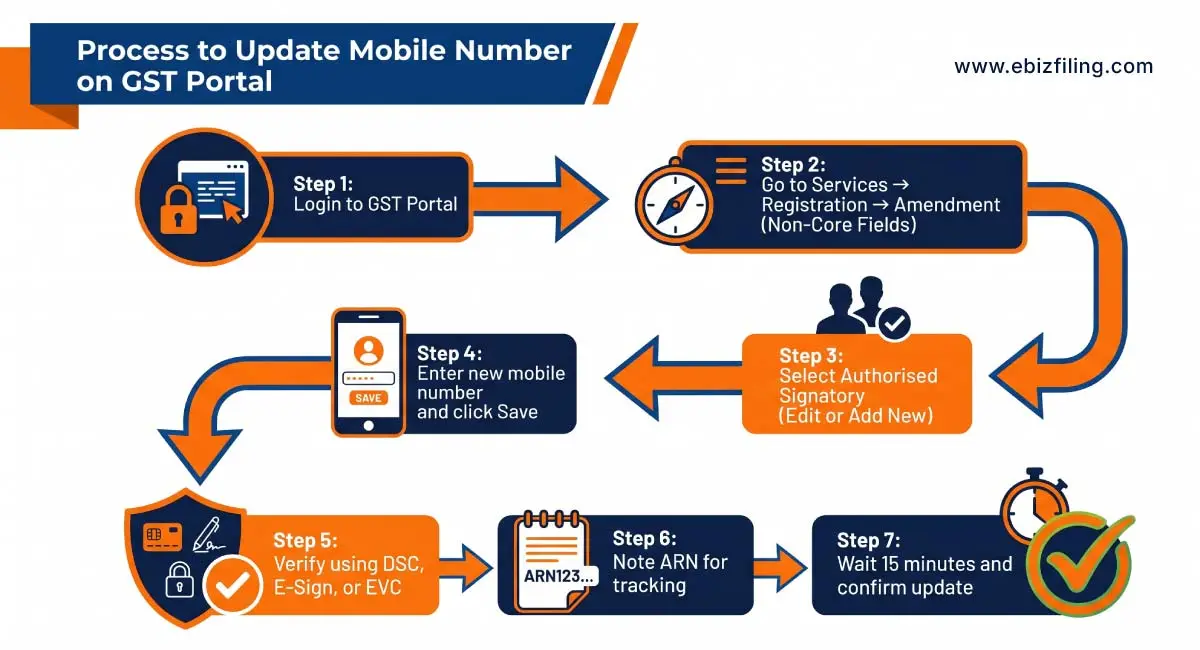
Understand the complete process to update mobile number on GST portal with proper verification steps.
1. Enter your login information to access the GST portal.
2. Select Services then Registration, after that Amendment of Registration (Non-Core Fields) from the top menu.
3. The amendment form has several tabs. The number you’re changing will be determined by:
- If it’s the Promoter, Partner, or Primary Authorized Signatory, click there to make changes next to the relevant person on the Promoter/Partners page.
- If it’s another Authorized Signatory, go to the Authorized Signatory tab and choose Edit that signatory or Add New (if the person isn’t already on the list).
4. If required, provide your new email and phone number. Click “Save.”
5.Click the Verify tab after entering new data. Pick from E-Sign, DSC (Digital Signature Certificate), and EVC (OTP) as your verification method. Once you’ve reviewed the declaration, click “Submit”. (If you utilize EVC/E-Sign, you will get an OTP via email or mobile device throughout the verification procedure.)
6. Make a note of the confirmation’s ARN (Acknowledgement Reference Number) or snap a screenshot of it. Save it for future reference in case something goes wrong.
7. Wait around 15 minutes to confirm the change, then log out and back in under Services, Registration , Search Taxpayer or My Profile / View Registration. According to user manuals and government guidelines, you should wait a few minutes for the system to refresh.
Common problems and fixes
1. OTP not received:
Service disruptions, wrong numbers, and mobile network latency can all impede OTP delivery. Verify the number you entered twice, try the OTP again (it will be delivered again), and if it is still not received, try another verification technique to update mobile number on GST Portal, such as a Digital Signature Certificate. Check the phone’s Do Not Disturb settings as well.
2. Not permitted to amend:
In order to submit an amendment, you need to be logged in as an authorized signatory or possess the appropriate position. Ask the primary authorised signatory to add you as an authorised signatory or make the change if you don’t have permission.
3. Change not visible:
Wait about fifteen minutes and refresh to see the change. Note the ARN and get in touch with the GST helpdesk or grievance portal if it hasn’t appeared yet. For technological issues, the GST system also offers a complaints/issue lodging facility.
4. Mobile is linked to Aadhaar / other services:
Some authentication flows (such as specialized e-sign flows) may demand that the mobile device be operational and capable of receiving OTPs. The mobile device is linked to Aadhaar and other services. If you wish to use Aadhaar-based e-KYC and your Aadhaar mobile number changes, be sure you update it through UIDAI protocols. Keep in mind that Aadhaar laws are always changing, so check with UIDAI for the most recent regulations.
Best Practices and tips on how to update mobile no. on GST portal
- GST uses your mobile number for legal and security communications, so make sure you (or your authorized signatory) will keep it for the long run.
- If one authorized signatory is not available, have a backup in the profile so that authentication and alerts can continue to work.
- Test the login and OTP processes after updating the phone to make sure everything functions (try a profile view or small action that causes an OTP).
- Until the modification is reflected and you receive any email acknowledgements, keep the ARN and submission screenshots.
- If you also need to verify import-related records, you can check the process to search bill of details on GST portal for accurate transaction tracking.
Update Mobile Number on GST Portal with Ebizfiling
At Ebizfiling, the process of Update Mobile Number on GST Portal becomes simple, accurate, and hassle-free.
- Our team files your GST registration modification under non-core fields without errors.
- The procedure involves updating or adding authorised signatory information as needed.
- DSC, E-Sign, and EVC verification are all supported by appropriate advice.
- OTP difficulties and ARN tracking are managed well.
- Continuous follow-up ensures that your update is finished effectively.
Get expert help from Ebizfiling to complete your GST mobile number update without delays.
Conclusion
Keeping Update mobile number on GST portal ensures that you receive essential updates, OTPs, and notices no interruption. You can successfully perform the update by following the necessary modification procedure and verification processes. If you face technical difficulties, seeking expert assistance might help you prevent delays.
FAQs to Update Mobile Number on GST Portal
1. What happened if my GST-registered mobile number is not active?
If a GST registered mobile number is inactive, you may have problems logging in, getting an OTPs, or completing verification processes on the GST Portal. In these situations, you should update your cell number using a non-core change that employs alternate verification techniques such as DSC or E-Sign. If access difficulties remain, getting expert assistance can help you restore easy access while avoiding compliance issues.
2. How to change email ID on GST portal?
You may update your email address using the same non-core amendment method. After login in, go to the modification area and change the authorised signatory information where the email is recorded. Enter your new email address, save the form, and finish verification. Because OTP is required, please make sure your email is current. Once came in the GST system will change your email address for free.
3. How to change contact details on GST portal?
To update mobile number on GST portal or email, file a non-core amendment through your GST account. Edit the authorised signatory information, enter the updated details, and complete verification. Many businesses choose professional support like Ebizfiling to ensure the amendment is filed correctly and avoid delays or technical issues.
4. How do I edit contact details in the GST portal?
You may update mobile number on GST portal by login into your GST account and choosing Amendment of Registration. Choose the appropriate area containing the contact information, make the necessary adjustments, and save the form. Complete the verification procedure using the available techniques. The change is processed after submission and may be tracked using the ARN.
5. How to change mobile number in GST portal for a company?
Only the authorized signatory or a user with appropriate privileges can edit a company’s cellphone number. Under non-core amendment, you must modify the approved signatory data. If the mobile number belongs to a new individual, then add them as an authorized signatory and then change the contact information to accomplish the procedure correctly.
6. How can I changes the registered cellphone number in the e-invoice portal?
The e-invoice portal has been linked to GST expertise, thus altering the mobile number on the GST Portal usually results in an update in the e-invoice system. In rare situations, you may need to log in individually to the e-invoice site and change your profile information. Keeping both systems up to date ensures that authentication runs well all throughout billing.
7. How to find contact details using GST number?
The GST Portal’s Search Taxpayer tool allows you to look for basic company information such as your name and status. However, sensitive information such as mobile number and email is not publicly available due to privacy rules. Services such as Ebizfiling may help with precise updates and verification while also assuring compliance.
8. What documents are required to update mobile number on GST portal?
True, no further documentation are required to change a mobile number under the non-core change. You only need a valid login and access to verification methods like DSC, EVC, or E-Sign. However, if you are adding a new authorized signature, vital data such as name, designation, and contact information must be given.
9. Why is becoming it necessary to update mobile number on GST portal?
Updating number on the GST portal means that you get OTPs, alerts, notices, and important communications from the GST department without interruption. Ebizfiling help you to keep updated for outdated number which lead to missed compliance updates, failed verifications, and delays in filing GST returns or amendments.
10. Can I track the status of my mobile number update on GST portal?
Yes, once you submit the amendment application with the help of Ebizfiling help, the GST Portal generates an ARN. You can use this ARN to track the status of your request under the “Track Application Status” option. This helps you to confirm whether the update has been processed successfully or requires further action.





Need to Change Your GST Mobile Number?
Get a quick and hassle-free guide to update your mobile number and stay compliant.
About Ebizfiling -



October 13, 2026 By Srishti M
October 12, 2026 By Srishti M
October 12, 2026 By Srishti M
Company Compliance Calendar November 2026: Key Due Dates & Filings Introduction The Company Compliance Calendar November 2026 highlights important annual return, dematerialisation and income tax compliances that companies may need to complete during the month. November 2026 is particularly […]